Your Home Page
After logging in, you'll be taken to your home page. This is your personalized page for the event which gives you access to the purchase order system, various vendor agreement forms and your sales reports during the event week. We've broken this page into three areas, which we'll discuss in more detail below.
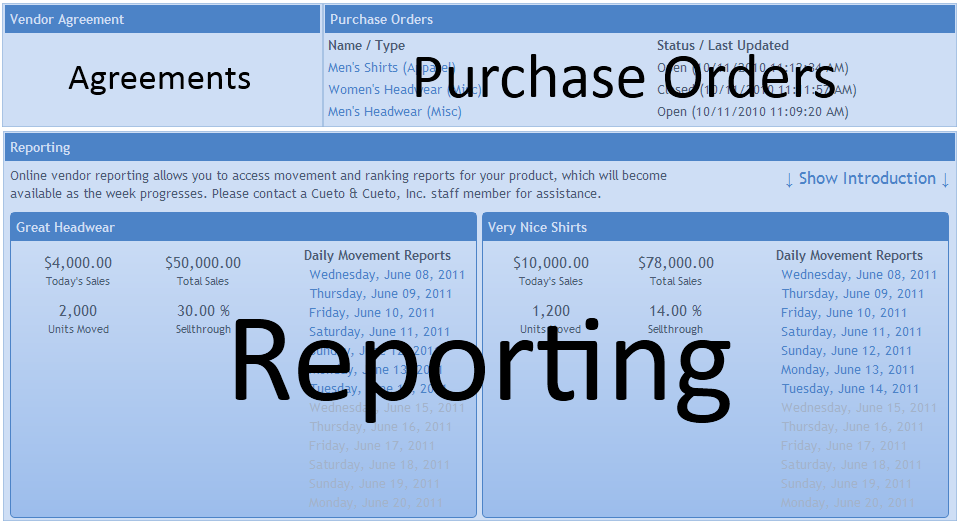
Purchase Orders
The Purchase Orders section lists all of the purchase orders for each vendor you're associated with. For each purchase order, you'll see the name, type (Apparel, Bottoms, Children's, or Miscellaneous), status (Open or Closed) and the date it was last modified. Click on the name to view the purchase order in full detail. The purchase order screen is broken into two sections:
Items/Lines

This section works similar to an Excel spreadsheet - tab between the active fields to change values, which will be saved as soon as you move on to the next field. Most purchase orders will only let you input a quantity (Miscellaneous Orders) or size breakdown (all other types) and the quantity of units on reserve. If you need to adjust other values, please let the event staff know.
Purchase Order Details

This box, located on the bottom of the page, contains details and target numbers for the entire purchase order. The Total Cost and Total Units will update automatically as you enter information above. If the event has set a maximum cost or unit threshold, the text will turn red once you cross that threshold. The Show Sizes check box toggles the display of the size breakdown for each item.
The Export Tool lets you export this purchase order in a variety of formats. Currently, the system can go directly into Excel with a CSV file and be imported into many database systems using the XML option. We'll be adding a PDF and XPS option shortly. If your in-house system has a special import format, please get in touch with Cueto & Cueto so we can add support for that format and save you the task of duplicating the order.
Agreements
Depending on the event, the Agreements section may be blank or may contain one or more vendor agreements. Each agreement will have a color-coded status listed next to the name and you can view or modify your responses by clicking on the icon next to the agreement.
Reporting
In the Reporting section, you'll see a separate box for each vendor you represent, containing some basic statistics as well as links to your movement reports. The links will become active approximately one hour after the start of business that day and will remain active indefinitely. You'll need a PDF viewer to view your reports; if you're using one of our vendor stations on-site, it will already have the software you need.
If this is your first time visiting the site, please click the Show Introduction link in the header to see some basic information on the site and a brief overview of sellthrough goals for the week.
Help! How do I...?
You're never on your own when you're using our software. If we're on site, please come visit us in person near the Point of Sale area.
If we're not on site, you can e-mail John at
cueto.john@gmail.com. If you want to report a problem or make a suggestion, use the link at the bottom of every page that says
Help us improve this software!